
I have a rectangle given by 4 points. I'm trying to compute a transformation matrix such that the rectangle will appear straight and centered within my viewport.
I'm not even sure where to begin.
If we take the top left point to be $p0$, and work clockwise, $p1$ ... $p3$, then I think the angle of the rectangle can be computed with something like:
$$ \theta = tan^{-1}(\frac{p1.y-p0.y}{p1.x-p0.x}) $$
Which I should then be able to use to rotate around the $z$ axis using this formula:
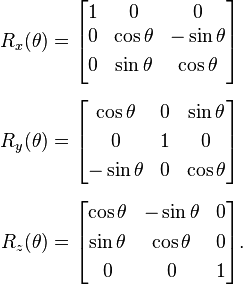
But I'm still not sure how I get it to rotate around the center of the rectangle and then position and scale it correctly.
In C# code, here's what I've got so far:
var center = _drawingPoly.Aggregate((a, b) => a + b)/_drawingPoly.Count;

var r = _drawingPoly;
var rect = new SizeF(
    (_drawingPoly[1] - _drawingPoly[0]).Length,
    (_drawingPoly[0] - _drawingPoly[3]).Length
);

var cosT = (r[1].X - r[0].X) / rect.Width;
var sinT = (r[0].Y - r[1].Y) / rect.Width;

var R = new Matrix4(
    cosT, sinT, 0, 0,
    -sinT, cosT, 0, 0,
    0, 0, 1, 0,
    0, 0, 0, 1
);

var rectAspect = rect.Width / rect.Height;
var ctrlAspect = glControl.Width / (float)glControl.Height;

float sx, sy;

if (rectAspect < ctrlAspect)
{

    sy = -2f / rect.Height/1.1f;
    sx = -sy / ctrlAspect;
}
else
{
    sx = 2f / rect.Width/1.1f;
    sy = -sx * ctrlAspect;

}

float aspectRatio = glControl.Width / (float)glControl.Height;


var T = Matrix4.CreateTranslation(-center.X,-center.Y,0);
var S = Matrix4.Scale(sx, sy, 1);
var mat = T*R*S;
This mostly works, but $p0$ always has to be the top left vertex otherwise the image will get rotated. Working on a solution for that.
And here's a real life example. I'm trying to use the selection rectangle to orient this image:


Disclaimer: I am assuming you are working in 2D, as rectangles and viewports usually are express in 2D coordinates.
Let the four corners of the viewport be $v,v+w,v+w+h$ and $v+h$, where $v$ is the top left corner of the viewport, and $h$ and $w$ are the height and length respectively of the viewport.
Let the four corners of the rectangle be $r_0, r_1, r_2$ and $r_3$, where $r_0$ has the highest `$y$' coordinate and proceeding clockwise. The height $h_r$ and width $w_r$ of the rectangle can be calculated using Pythagoras's formula. $$ \begin{align*} h_r&=\sqrt{\left(r_3^{(x)}-r_0^{(x)}\right)^2+\left(r_3^{(y)}-r_0^{(y)}\right)^2}\\ w_r&=\sqrt{\left(r_1^{(x)}-r_0^{(x)}\right)^2+\left(r_1^{(y)}-r_0^{(y)}\right)^2} \end{align*} $$
You also need to check the aspect ratio to ensure that the rectangle isn't too wide. This will be used to determine the scale factor $s$.
Now, to rotate the rectangle, scale it appropriately and align it within the viewport, a fourfold transformation is required;
Assuming that $r_0$ will be rotated into the top left corner, the following identities are true for the rotation by an angle of $\theta$ in a counter-clockwise direction. $$ \begin{align*} \cos\theta&=\frac{r_1^{(x)}-r_0^{(x)}}{w_r}\\ \sin\theta&=\frac{r_0^{(y)}-r_1^{(y)}}{w_r} \end{align*} $$
The rotation matrix $R$ is then $$ R=\begin{bmatrix} \cos\theta&-\sin\theta\\\sin\theta&\cos\theta \end{bmatrix}. $$
The centre of the rectangle $c_r$ is able to be expressed as $$ \begin{align*} c_r^{(x)}&=\frac14\sum\limits_{i=1}^4r_i^{(x)},\\ c_r^{(y)}&=\frac14\sum\limits_{i=1}^4r_i^{(y)}, \end{align*} $$ and the centre of the viewport $c$ as $$c^{(x)}=v^{(x)}+w/2 \qquad c^{(y)}=v^{(y)}+h/2.$$
The combined transformation for each point is then $$ r_k^{new}=sR(r_k-c_r)+c, $$ where each of $r_k$, $c_r$ and $c$ are expressed as a $2\times1$ vector.